Repository Secrets
Store sensitive credentials securely and inject them into your runners as environment variables.
Overview
Repository secrets let you:
- Store API keys, database URLs, and credentials
- Keep secrets out of your codebase
- Automatically inject them into runners
- Rotate secrets without code changes
Info: Secrets are stored securely with per-user isolation. They are never exposed in logs.
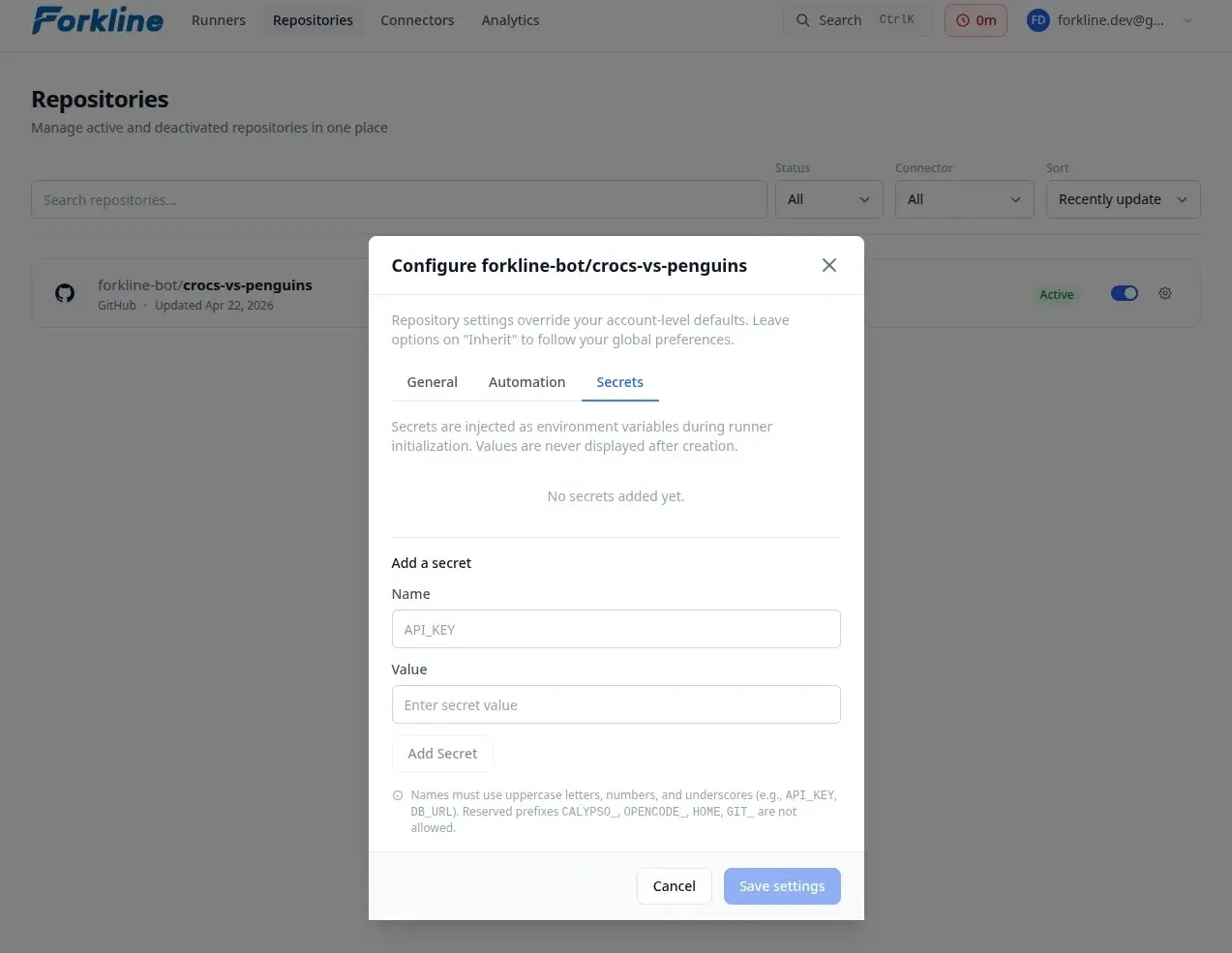
Managing Secrets
Adding a Secret
- Navigate to Repositories
- Find your repository
- Click Settings on the repository card
- Select the Secrets tab in the modal
- Click Add Secret
- Enter:
- Name: Environment variable name (e.g.,
DATABASE_URL) - Value: The secret value
- Name: Environment variable name (e.g.,
- Click Save
Secret Naming Rules
Secret names must be valid environment variable names:
- Uppercase letters, digits, and underscores only
- Must start with a letter or underscore
- Maximum 255 characters
# Valid secret names
DATABASE_URL
API_KEY
MY_SECRET_TOKEN
_PRIVATE_KEY

# Invalid secret names
database-url    # lowercase and hyphen
123_API_KEY     # starts with digit
MY-SECRET       # contains hyphen
How Secrets Work
Injection into Runners
When a runner starts:
- Forkline loads your secrets
- Secrets are injected as environment variables
- Scripts and processes can access them
# Example: Using secrets in setup script
#!/bin/bash
# .forkline/setup.sh

# Secrets are available as environment variables
echo "Connecting to database..."
npm run migrate --database-url="$DATABASE_URL"

# Use API keys
curl -H "Authorization: Bearer $API_KEY" https://api.example.com/seed
Common Use Cases
Database Credentials
DATABASE_URL=postgres://user:pass@host:5432/db
DATABASE_PASSWORD=super-secret-password
API Keys
STRIPE_API_KEY=sk_live_xxxxx
SENDGRID_API_KEY=SG.xxxxx
AWS_ACCESS_KEY_ID=AKIAxxxxx
AWS_SECRET_ACCESS_KEY=xxxxx
Best Practices
- Rotate secrets: Regularly update secret values
- Minimal scope: Only add necessary secrets
- Audit regularly: Review secrets list for unused entries
- Use descriptive names:
DATABASE_URL_PROD,API_KEY_STRIPE
Next Steps
- Set up setup scripts
- Start a runner with your secrets