Starting Runners
Learn how to start and configure runners for your repositories.
Prerequisites
Before starting a runner, ensure you have:
- A configured git connector
- An activated repository
Starting a Runner
- Navigate to Repositories
- Click the active repository card to open the runners view
- Click Start runner
- In the Start runner modal, configure your options
- Click Start
Note: On the Repositories page, clicking the repository name opens the repository on your git provider. Click the card to open the runners view in Forkline.
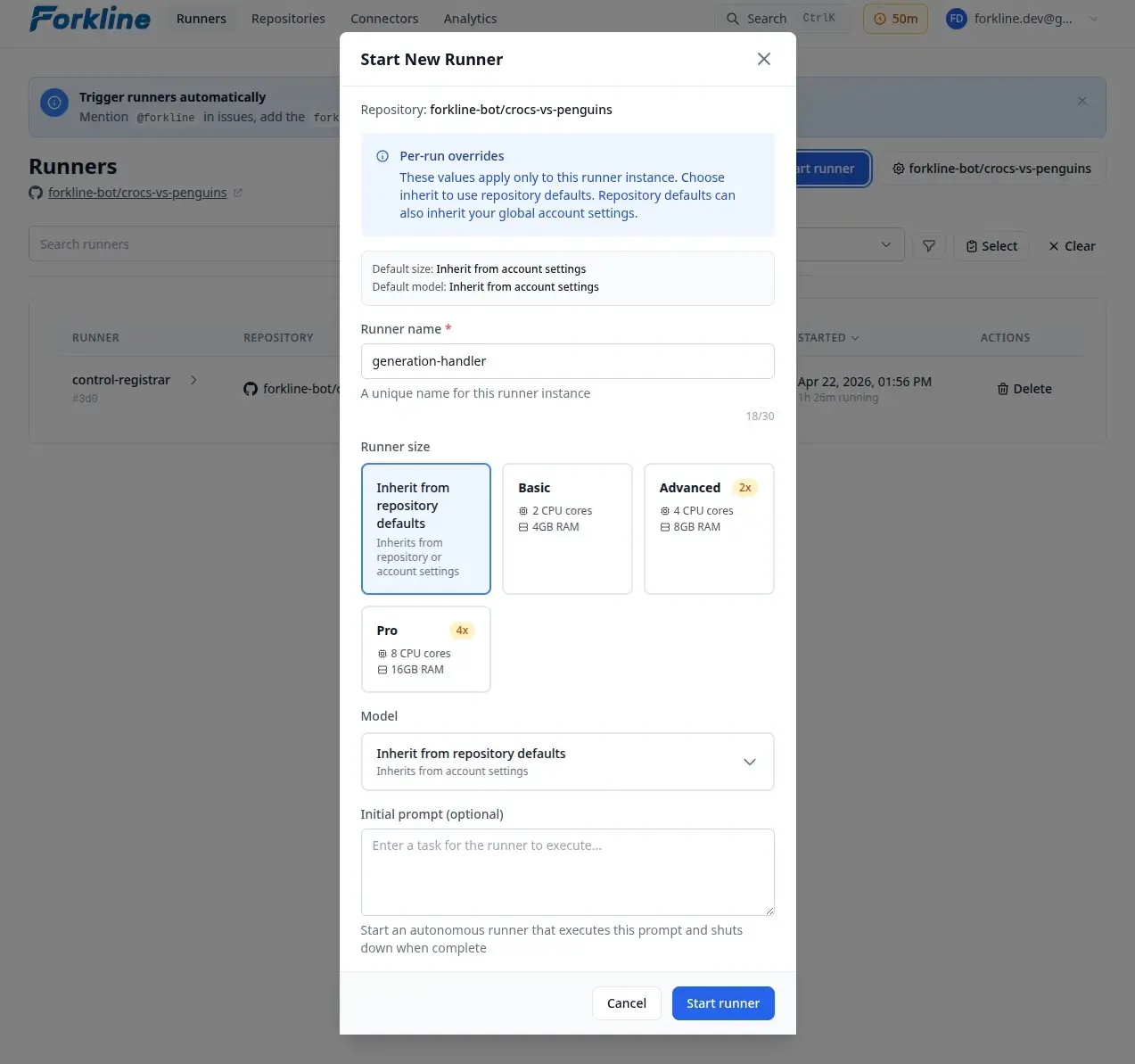
Configuration Options
Name
Give your runner a meaningful name:
- Default:
runner-{short-id} - Maximum: 30 characters
- Allowed: Letters, numbers, hyphens, underscores
Size Selection
| Size | CPU | RAM | Rate | When to Use |
|---|---|---|---|---|
| Basic | 2 | 4GB | 1× | Quick edits, documentation |
| Advanced | 4 | 8GB | 2× | Most development tasks |
| Pro | 8 | 16GB | 4× | Large codebases, heavy builds |
Model Selection
Override the default AI model for this runner:
- In the Model dropdown, select a model from your configured providers
- Optionally, choose “Inherit from repository defaults” to use the repository’s default model
Branch Selection
Choose which branch to clone:
- Default: Repository’s default branch
- Alternative: Any existing branch
- New branch: Enter a name to create one
Startup Process
When you start a runner, Forkline:
- Validates your account
- Creates an isolated environment
- Clones your repository
- Runs setup scripts (if present)
- Initializes the AI agent
Info: Startup takes 30-60 seconds.
Customizing the Environment
Setup Scripts
Prepare your runner environment with a setup script that installs mandatory dependencies and adds safeguards for the AI agent:
.forkline/
└── setup.sh    # Bash setup script
The setup script runs after the repository is cloned and before the AI agent initializes. Use it to ensure the runner has all tools and configurations needed to complete tasks effectively.
Example: Installing dependencies
#!/bin/bash
# .forkline/setup.sh

npm install
npm run db:migrate
This ensures the AI agent can run tests, build commands, and other project operations immediately.
Example: Multi-language projects
#!/bin/bash
# Install Node.js dependencies
npm install

# Install Python dependencies
pip install -r requirements.txt

# Setup database
python scripts/setup_db.py
Example: Using secrets
#!/bin/bash
# Secrets are available as environment variables with their original names
npm run migrate --db-url $DATABASE_URL
Repository secrets configured in settings are injected as environment variables with the exact names you defined.
Example: Adding safeguards with pre-commit
#!/bin/bash
# Install pre-commit framework
pip install pre-commit

# Install hooks defined in .pre-commit-config.yaml
pre-commit install

# Install pre-push hooks for additional validation
pre-commit install -t pre-push
This ensures the AI agent follows project conventions and linting rules when making commits.
See Setup Scripts for details.
Repository Secrets
Inject sensitive credentials:
- Go to repository settings
- Add secrets like
DATABASE_URL,API_KEY - Secrets are available in setup scripts
Startup Failures
Insufficient Balance
Error: “You need at least 5 minutes of balance to start a runner”
Solution: Add time to your account
Clone Failed
Error: “Failed to clone repository”
Solution: Verify connector has repository access
Setup Script Issues
If setup scripts fail, check:
- Script syntax
- Required dependencies
- Environment variables
Note: Setup script failures are logged but don’t prevent the runner from starting.